


Skillshare: Online Classes App
4.14.79K Reviews
App Specs
- Version
- 5.4.81
- Updated On
- License
- Free
- Downloads
- 1,000,000+
- Developer
- Skillshare, Inc
- Categories
- Education
- Platform
- Android
Screenshots
 Analysis by AppCompare
When I want to learn a creative skill without committing to a full-time course, I like having lessons I can fit around the rest of my day. Skillshare: Online Classes is built for that kind of learning: it brings together video classes on subjects such as photography, drawing, sketching, and other creative pursuits. I find it most useful when I have a specific thing I want to make or improve, rather than when I’m simply looking for a general lecture to play in the background.
A practical way to begin
My best results come from choosing one small goal before opening the catalog. “Get better at drawing” is too broad; “practice sketching a mug using simple shapes” gives me a reason to choose a class and a way to judge whether I learned something. I browse or search for that topic, look at the lesson structure, and pick a class that seems suited to my current level and available time.
That approach also helps with a common online-learning trap: collecting classes instead of doing the work. I try to follow one course long enough to attempt its exercises before switching to another. A short note after each session—what I tried, what confused me, and what I’ll practice next—turns separate videos into a useful learning routine. It’s a simple habit, but it helps me remember more than watching several lessons in one sitting.
Who benefits most from the format
The app is a good fit for curious beginners, hobbyists, and working creatives who want guided practice in manageable pieces. If I have a spare stretch of time at lunch or want to work on a personal project after dinner, I can use a lesson to get past the blank-page stage and then spend time applying the idea myself. The course format is especially appealing when I want to explore an unfamiliar creative area without first planning a formal curriculum.
It is less suitable if I need a credential, a tightly assessed academic program, or direct coaching at a fixed pace. A video lesson can demonstrate a technique, but it cannot automatically spot every flaw in my work or make me practice. For a high-stakes professional qualification, a structured program with assessment may be a better choice; for one-to-one critique, I would look for a tutor or a community focused on that discipline.
Everyday learning, not just watching
A realistic way to use Skillshare is to turn a commute or a quiet evening into a two-part session. I might watch a lesson about a drawing technique when I have a few minutes, then open a sketchbook later and try it on an object at home. If I’m learning photography, I can watch a relevant class before going out, then take a small set of pictures with one idea in mind. The useful part is the transfer from screen to practice, not the number of videos I finish.
For a repeatable routine, I keep the next lesson in mind before I stop and leave myself a concrete task for the next session. I also avoid treating playback speed as a shortcut through everything: faster playback can help with familiar explanations, while a new technique usually deserves normal speed and a pause to try it. That small distinction makes flexible video learning feel more deliberate.
Worth Reading Before You Choose

EA SPORTS FC Mobile 26 Is a Bigger Football Game, but It Takes Time

Flipboard Shows What News Apps Must Do Beyond the Feed

Switching to Android Auto Means Rethinking Your Driving Routine

Google Calendar Makes a Crowded Week Easier to Manage

Ludo King Makes the Most of the Minutes Between Plans

Baby Panda World Brings Quick Play to Modern Phones, but Its Game Library Feels Busy
Getting Started with Skillshare
First things first, downloading the app was a breeze. Whether you’re on Android or iOS, it’s just a matter of a few taps, and boom, you’re in. Setting up an account is straightforward, and before you know it, you’re scrolling through a vast ocean of classes. Seriously, it’s like having a university right in your pocket!
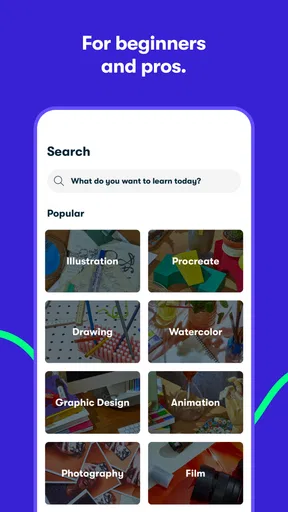
What I love about Skillshare is how it doesn’t overwhelm you. The interface is clean, and you can easily find classes by category or search for something specific. From photography to graphic design, and even cooking, there’s something for everyone. The app also suggests classes based on your interests, which is pretty neat.
Exploring the Course Catalog
Now, let’s talk content. The range of classes on Skillshare is impressive. I started with a course on digital illustration, taught by an industry professional who was super engaging. The classes are broken into short, manageable videos, making it easy to fit learning into a busy schedule. Plus, you get to see reviews and ratings from other learners, which helps in choosing the right course.
It’s not just the number of classes that’s impressive, but also the quality. The instructors are knowledgeable, and they present the material in a way that’s easy to understand. You can tell that a lot of thought has gone into ensuring the courses are not only informative but also enjoyable.
Choosing classes with care
I don’t rely on a class title alone when I’m deciding what to watch. I check whether the instructor appears to explain the steps I need, whether the lessons seem to build toward a practical result, and whether the class fits what I can do with the tools I already have. A drawing lesson that assumes a particular tablet setup may be less useful to someone working with pencil and paper, while a photography class may be easier to adapt if it focuses on composition rather than a specific camera model.
Reviews can help me spot whether other learners found a class clear, but I treat them as a guide rather than a guarantee that it will suit my needs. The more specific my goal, the easier it is to tell whether a course is a sensible match. I also try a sample of the teaching style before settling in; an instructor’s pace and way of explaining can matter as much as the subject itself.
Community and Networking
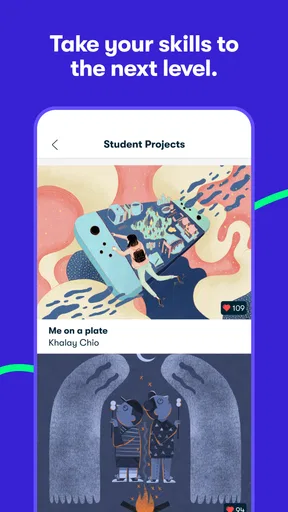
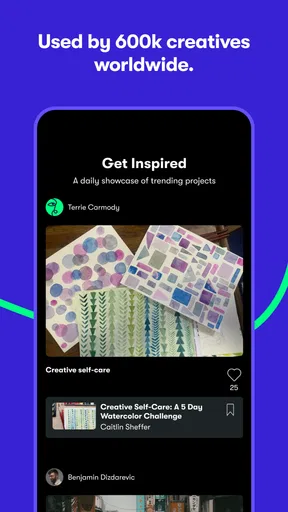
One of the standout features of Skillshare is the community aspect. You’re not just watching videos; you’re part of a community of learners. There’s a discussion section where you can ask questions, share projects, and get feedback. It’s like having a bunch of study buddies from all over the world.
I found this particularly useful when I was trying to tackle a tricky project. The feedback I received from both the instructor and fellow students was invaluable. It’s this interaction that makes the learning experience feel personal and engaging.
Making feedback useful
I get more from sharing work when I ask a narrow question instead of simply posting a finished piece and hoping for general reactions. For example, I might ask whether the main subject reads clearly or whether a sketch’s proportions feel balanced. Specific questions give other learners something concrete to respond to, and they make it easier for me to turn comments into a next step.
I also treat community feedback as another perspective, not a final verdict. Creative choices are often subjective, and a suggestion that works for one style may not fit another. If I receive conflicting advice, I compare it with the class lesson and my own goal, then test one change at a time. That keeps feedback encouraging without letting it pull a project in too many directions.
Settings and a smoother routine
Before settling into a course, I check the playback controls and think about where I’m likely to study. Adjusting playback speed can help me revisit a familiar explanation quickly or give a dense demonstration more time. I avoid speeding through a lesson just to finish it; if I’m meant to draw, edit, or take photographs afterward, the pause for practice is part of the learning rather than wasted time.
Offline viewing is handy when I expect an unreliable connection, such as while travelling, but I plan that session in advance rather than assuming every class will be ready when I need it. I also keep my learning goal simple across devices: watch where it is convenient, then return to the project wherever I can work comfortably. The app’s cross-device syncing can support that rhythm, though the hands-on task may be easier on a larger screen or with physical materials nearby.
Accessibility and Flexibility
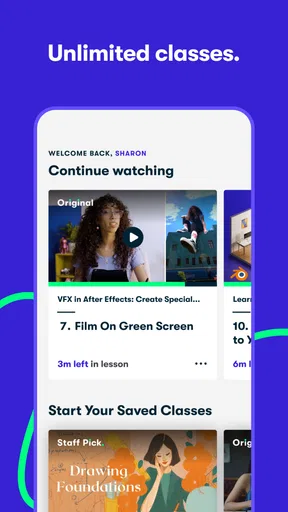
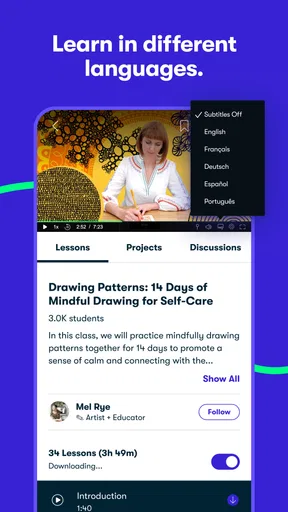
We live in a fast-paced world, and finding time to learn can be challenging. This is where Skillshare’s flexibility shines. You can download classes for offline viewing, which is perfect for those times when you’re commuting or just want to unplug. The app syncs across devices, so you can start a class on your phone and continue on your tablet or computer without missing a beat.
Another thing I appreciated was the option to adjust the playback speed of the videos. Sometimes, I like to speed through content I’m familiar with or slow it down for more complex topics. It’s little features like these that enhance the overall user experience.
How it compares with other ways to learn
Compared with searching for free tutorials across video platforms, a class-based catalog gives me a clearer path through a subject: lessons are grouped around a teaching goal rather than left as unrelated clips to assemble myself. That structure is useful when I need a starting point, though free individual tutorials can be better when I only need one narrow answer or want to compare many different demonstrations quickly.
Compared with a traditional course, Skillshare feels more flexible and less formal. I can dip into a creative topic without following a rigid timetable, but that freedom means I have to supply my own consistency. Someone who thrives on deadlines, graded assignments, or a teacher checking every stage may prefer a more structured option. I see this app as a practical source of instruction and inspiration, not a replacement for every kind of education.
Cost, access, and expectations
Skillshare is free to install, and its developer is Skillshare, Inc. The app is in the education category, has an Everyone age rating, and is rated 4.1 on average from around 58 thousand ratings, with about 4.8 thousand written reviews. It has over one million installs. Those figures suggest a well-used learning app, but they don’t tell me whether a particular class will match my taste, so I still choose by topic, teaching style, and the work I want to do.
There are in-app purchases, with listed items ranging from $9.99 to $167.99. I would check the purchase details in the app before committing and consider how often I’ll realistically use the classes. The right value depends on whether I’ll return to lessons and practice projects, not merely on how many topics catch my eye. If I only want an occasional answer, a free tutorial elsewhere may be the more sensible choice.
Limits worth knowing before you settle in
The short-video format makes it easy to fit learning into a busy day, but it can also make a subject look simpler than it feels when I try it myself. A demonstration gives me a model to follow; it does not guarantee I can reproduce the result on my first attempt. I plan for trial and error, especially with drawing and photography, where small decisions can change the outcome.
Another trade-off is choice. A broad catalog is helpful when I’m exploring, yet it can tempt me to keep browsing instead of starting. I’ve found it better to choose one class, define a modest project, and return to the catalog only when I know what I need next. If the course assumes tools or background knowledge I don’t have, I would rather switch early than force a poor fit.
The Android app is listed as version 5.4.81 and requires Android 5.0 or later. Skillshare was released on May 18, 2015, and has continued as a mobile option for creative learning. On iOS, I’d still check that my device can run the current app version before planning a course around it. Either way, I treat the phone as a convenient place to watch and organize learning, while choosing the device or materials that make the actual creative task comfortable.
Final Thoughts
In a nutshell, Skillshare: Online Classes is a fantastic tool for anyone looking to expand their knowledge and skills. Whether you’re a hobbyist or a professional looking to upskill, there’s something here for you. The app’s user-friendly interface, high-quality content, and vibrant community make it a standout in the world of online learning.
If you’re curious and ready to explore a new hobby or refine your skills, give Skillshare a try. It’s an investment in yourself that’s both fun and rewarding. Trust me, once you start, you won’t want to stop learning!
My verdict after using it as a learner
I recommend Skillshare when I want guided creative practice with room to choose my own pace. Its strongest use is helping me move from “I’d like to learn this” to a first attempt: select a focused class, watch with a project in mind, and make something before the idea fades. That is more valuable to me than browsing endlessly for the perfect course.
I would skip it if I needed formal certification, close supervision, or a guaranteed path to professional proficiency. For everyone else, the best approach is modest and repeatable: one learning goal, one lesson at a time, and a small project that proves what stuck. Used that way, Skillshare can be a useful companion for creative growth rather than just another app full of videos.
Pros
- Wide variety of courses available.
- User-friendly interface and navigation.
- Offline viewing for premium users.
- High-quality video lessons.
- Community interaction through projects.
Cons
- Limited free content availability.
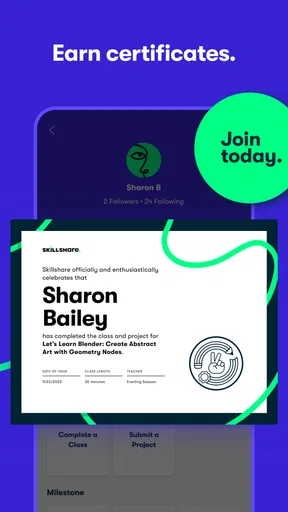
- No certificates for completing courses.
- Some courses lack depth.
- Variable quality of instructors.
- Monthly subscription can be costly.
FAQs for Skillshare: Online Classes App
What types of courses are available on the Skillshare app?
Skillshare offers a wide variety of courses across multiple disciplines, including creative arts, business, technology, and lifestyle. Users can explore topics such as graphic design, photography, web development, and entrepreneurship. Each course is usually project-based, allowing users to practice their skills while learning from industry professionals.
Is there a free version of Skillshare available?
Skillshare offers a free version that provides access to a limited selection of classes. However, to unlock the full library of over 30,000 courses, users need to subscribe to Skillshare Premium. The premium subscription also includes additional features like offline viewing and the absence of advertisements.
Can I download courses for offline viewing?
Yes, Skillshare Premium members can download courses to watch offline. This feature is particularly useful for users who want to learn on the go without relying on an internet connection. It allows for a flexible learning experience, accommodating different lifestyles and schedules.
How does Skillshare’s community feature enhance the learning experience?
Skillshare’s community feature allows learners to connect with peers and instructors through discussions and project sharing. This interactive component fosters a collaborative learning environment where users can receive feedback, share ideas, and gain inspiration from others, enhancing their overall educational experience.
Are there any prerequisites for enrolling in Skillshare courses?
Most Skillshare courses do not require prerequisites, making them accessible to beginners and advanced learners alike. Course descriptions typically outline any necessary materials or prior knowledge, ensuring users can choose classes that match their skill level and interests without any confusion or barriers.


